Top 7 Arcade Alternatives for Interactive Product Demos in 2025
 George Apostolov
- 07 Nov 2025
Arcade excels at creating quick screenshot-based demos with an intuitive interface that makes it easy to get started. Their branching features and creative polish make it simple to produce attractive product tours that look great on websites.
"Arcade makes it really easy to create interactive demos. The interface is clean and the branching feature helps create more engaging experiences." - User on G2
However, as teams scale and requirements evolve, many organizations find themselves hitting limitations around HTML capture, analytics depth, and advanced demo functionality. If you're outgrowing Arcade's screenshot-focused approach or need more versatile demo formats, here are seven proven alternatives that address these gaps while maintaining cost-effectiveness.
In this guide you'll find a detailed breakdown of the most popular Arcade alternatives, showing what use-cases they best cater to, along with honest insights about pricing, features, and potential limitations.
Why Trust This Guide
I'm part of the LiveDemo.ai team - one of the alternatives you'll (obviously) find listed here.
Being in the trenches of the demo software world myself means that while I can't claim complete neutrality, I do think about interactive demos extensively. What works, what doesn't, and what our customers actually need versus what sounds good on paper.
We update this guide regularly to reflect new tools, pricing changes, and feature updates (the interactive demo space moves fast!).
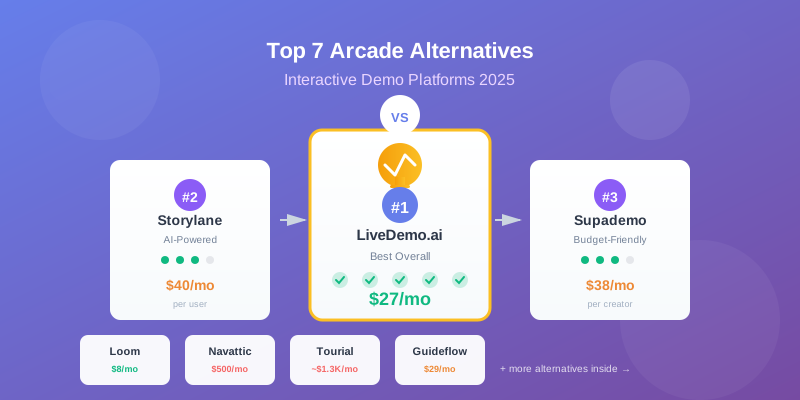
🏆 The 7 Arcade alternatives most companies should consider
TL;DR Comparison Table
Why teams look beyond Arcade
Based on conversations with customers who've migrated from Arcade, three limitations consistently drive the search for alternatives:
- Limited demo capabilities: Arcade focuses primarily on screenshot and screen recording demos, which limits teams that need interactive HTML walkthroughs for complex products. True HTML capture (fully interactive clone) is only available in Enterprise plans, requiring 10+ users and custom pricing. Furthermore, Arcade trails behind competitors in terms of AI demo creation features, conference mode, and demo libraries.
- Basic analytics and lead intelligence: Teams struggle with Arcade's limited viewer tracking and engagement insights compared to more robust alternatives that offer deeper analytics for lead qualification and ABM use-cases.
- Customization constraints: Screenshot demos offer limited realism and flexibility. For teams whose products receive regular design updates, maintenance becomes time-consuming. Because these demos are image-based, you can't edit any of the captured UI, which is an even bigger problem if you're working with sensitive or personal data.
"The per-seat pricing model doesn't quite align with how we see the value, as some of our team need to use it occasionally, and some only need it to browse the arcades we've recorded." - A Founder on G2
1. 🚀 LiveDemo.ai - Best overall Arcade alternative
Best for: Sales and marketing teams looking for a straightforward, affordable way to create interactive product demonstrations that go beyond screenshot-based demos without wrestling with complex tools or steep learning curves.
LiveDemo.ai consistently ranks as a top-rated demo automation software for teams seeking more versatility and advanced features than Arcade provides, especially for organizations needing demos across marketing, sales, and presales.
Why customers choose LiveDemo.ai over Arcade
After personally testing both platforms across multiple B2B campaigns, LiveDemo.ai addresses Arcade's core limitations:
- HTML demos included: Unlike Arcade's screenshot-focused approach where HTML capture is locked behind Enterprise plans, LiveDemo.ai supports interactive HTML demos on all plans, giving you the flexibility to create realistic product experiences from day one.
- Unlimited demos: Create as many demos as you need without worrying about limits or overage charges. Whether you have 2 users or 200, you get unlimited demos on all plans.
- Simple, transparent pricing: No per-seat charges that explode as your team grows. The Business plan at just $27/month provides full access to interactive demo creation - no hidden tiers, no mandatory annual contracts.
- Easy editing: With HTML demos, you can edit captured UI elements, change text, update images, and modify data without recapturing entire flows - a game-changer for teams working with sensitive data or frequently updating products.
- Superior flexibility: Pick the demo format that works best for your use case - interactive HTML demos for sandbox environments, embedded demos for websites, or shareable demos for sales outreach.
Killer Feature: Simple, transparent pricing starting free, with unlimited demos on all plans. The Business plan at just $27/month provides full access to interactive demo creation - no hidden tiers, no per-seat charges that explode as your team grows.
Potential deal-breaker: As a newer entrant in the space, LiveDemo.ai may have fewer integrations and advanced analytics features compared to more established enterprise platforms. Teams needing deep CRM workflows or extensive ABM analytics might need to evaluate if the current feature set meets their needs.
Real Pricing:
- Startup: Free forever
- Business: $27/month (billed monthly, not locked into annual contracts)
No sales calls required to get started. No surprise add-ons or per-seat charges as your team scales. 🎉
2. Storylane - Versatile demo platform with AI features
Best for: Marketing and sales teams that need multiple demo formats (screenshot, video, and HTML) in one platform, especially those who value AI-powered features and advanced analytics.
Killer feature: Storylane supports screenshot, video, AND HTML demos in one platform, along with AI features like automatic demo generation, AI voiceovers in 25+ languages, and AI video avatars. They also offer a Buyer Hub feature for creating galleries and playlists of multiple demos.
Potential deal-breaker: Pricing scales aggressively. While prices technically start at $40/user/month (if paid annually) for screenshot demos, HTML demos, sandboxes, demo hubs, and integrations are only available on their $500/user/month or $1200/user/month plans. Per-user pricing means costs increase linearly as your team grows.
Real Pricing:
- Free plan: First screenshot demo is free
- Starter: $40/month (screenshot, video demos, AI features)
- Growth: $500/month (adds HTML demos, team features)
- Premium: $1,200/month (Buyer Hub, advanced analytics)
3. Supademo - Best budget alternative to Arcade
Best for: Startups and small teams that need to ship interactive guides fast on a tight budget. Good fit for onboarding, help-center walkthroughs, and lightweight product tours.
Killer feature: Supademo offers similar ease-of-use to Arcade while providing multiple demo formats at an affordable price point. After you capture a flow, you can use AI to draft slide text, making demo creation faster.
Potential deal-breaker: Limited sophistication if looking to use across marketing or sales. They only offer static screenshot demos outside of their much more expensive "Growth" plan, which is $350/month flat with HTML/CSS demos.
"They're okay for internal docs, but I'm looking for something more dynamic that can work externally too like for onboarding, marketing, or even support." - User on r/SaaS
Real pricing: Free forever (up to 5 published demos). Scale at $38 per creator/month (annual billing). Growth is $350/month flat with 5 creator seats and HTML/CSS demos.
4. Loom - Video-focused demo creation
Best for: Teams that prioritize video demos and need instant screen recording capabilities with webcam support. Perfect for quick product walkthroughs, customer support responses, and async communication.
Killer feature: Loom excels at instant video creation. You can quickly record your screen with webcam overlay, add annotations, and share videos instantly. The interface is incredibly simple and the videos load fast.
Potential deal-breaker: Loom is purely video-based, so you lose the interactivity that comes with HTML demos or interactive guides. Viewers can't click through your product - they can only watch. For complex products that require hands-on exploration, this limitation can be significant.
Real pricing: Free (up to 25 videos, 5 minutes each). Business at $8/user/month (unlimited videos, up to 6 hours each). Enterprise pricing available.
5. Navattic - HTML-focused website demos
Best for: Mid-market/enterprise marketing orgs running PLG/ABM who need brand control, polished HTML demos, and can handle a learning curve.
Killer feature: Navattic specializes in HTML/CSS demos that create clickable, interactive experiences capturing your product's look, feel, and interactions. Their analytics & integrations are geared towards ABM, making it a strong contender if that's your primary use-case.
Potential deal-breaker: Steep learning curve and higher pricing. Users note the tool isn't the easiest to pick up quickly - expect significant time investment to fully leverage its HTML editor and features. Also, Navattic primarily focuses on top-of-funnel HTML demos, so you lose flexibility if you need other demo formats.
"Initially setting up each demo in Navattic can be a bit fiddly... there was a lot of redundant work to get each screen of the demo to match each other." - User on G2
Real Pricing: They do have a free plan but it's very limited (you can think of it as an extended free trial). Pricing really starts at $500/month on an annual plan for up to 5 users with basic features. If you want their ABM features, you're looking at $1,000/month and above.
6. Tourial - Microtours for top of funnel
Best for: Enterprise companies focused on top-of-funnel website demos and microtours that need to guide visitors through specific product features.
Killer feature: Tourial specializes in creating microtours - short, focused interactive guides that can be embedded on websites to guide visitors through specific features or workflows.
Potential deal-breaker: Limited use cases and high price point. Tourial is primarily designed for top-of-funnel website demos, so it's less versatile than alternatives. At approximately $16,000/year, it's significantly more expensive than other options, making it hard to justify unless you have a very specific, high-value use case.
Real pricing: Pricing is not public, but it's said to start at approximately $16,000/year for small teams.
7. Guideflow - User onboarding flows
Best for: Product teams that need step-by-step user guidance and onboarding flows, especially for in-app tours and walkthroughs.
Killer feature: Guideflow focuses on creating interactive, step-by-step user guidance that helps new users understand how to use your product. Good for in-app onboarding and feature discovery.
Potential deal-breaker: Limited to onboarding and guidance use cases. Guideflow is less suitable for sales demos, marketing campaigns, or external-facing product demonstrations. It's designed primarily for internal user onboarding rather than customer-facing demos.
Real pricing: Starts at $29/month for basic features, with higher tiers for advanced functionality.
⚠️ Common reasons for exploring Arcade alternatives
1. HTML demos locked behind Enterprise plans 💸
While Arcade makes it easy to create screenshot-based demos, true HTML capture (fully interactive clone) is only available in Enterprise plans, requiring 10+ users and custom pricing. This limitation forces teams that need realistic product experiences to either pay significantly more or look elsewhere.
For many organizations, HTML demos are essential because they:
- Provide a more realistic product experience than screenshot-based demos
- Allow editing of captured UI elements without recapturing entire flows
- Enable customization for different buyer personas and use cases
- Support complex interactions that screenshots can't capture
2. Per-seat pricing scales aggressively 📈
Arcade's per-seat pricing model means costs increase linearly as your team grows. A 4-user Growth workspace is $170/month if paid annually, and costs continue to climb as more team members need access.
The challenge is that interactive demos have such a wide range of use-cases that other teams at your company will likely come on board once they discover the tool. So the per-seat pricing can grow to be a real cost driver, especially when you consider that some team members might only need occasional access or just to browse recorded demos.
3. Screenshot demos lack realism and flexibility 📸
Screenshot demos offer a quick way to get started, but they come with significant downsides. The first drawback is that they feel less like a real product experience and more like navigating through a slideshow.
There's another issue. For teams whose products receive regular design updates, maintenance becomes time-consuming. UI changes and feature launches can mean recapturing screenshots, adjusting hotspots, and retesting entire flows. Because these demos are image-based, you can't edit any of the captured UI.
The same limitation is an even bigger problem if you're in an industry that works with sensitive or personal data. The inability to edit the captured UI means you'll be stuck blurring large areas of each screen you capture, which further detracts from the realism of the demo.
❓ (Not so) Frequently asked questions to ask vendors
Expensive mistakes happen when you don't ask about the edge cases, limitations, and real-world problems that only surface after you're locked into a contract. Here are some examples worth considering:
"Can I create HTML demos without upgrading to Enterprise?"
Many platforms lock HTML demos behind expensive tiers or enterprise plans. This can be a deal-breaker if you need realistic product experiences from day one.
LiveDemo.ai answer: HTML demos are available on all plans, including our free Startup plan. You don't need to upgrade to Enterprise or sign a custom contract to access interactive HTML demos.
"Do prices increase automatically at renewal, and by how much historically?"
Some vendors lock in pricing, others increase 10-20% annually. This affects your long-term budgeting and total cost of ownership.
LiveDemo.ai answer: We believe in transparent pricing. Any price changes are communicated well in advance, and we don't auto-increase your rates without notice.
"What happens if our team scales from 5 to 25 creators during our contract?"
Per-seat pricing can turn into a budgeting headache. Especially with interactive demo tools, where the variety of use-cases can mean that other teams are likely to jump on board once they discover the tool.
LiveDemo.ai answer: Our pricing doesn't change based on team size. Whether you have 2 users or 200, the Business plan stays at $27/month - no seat multiplication. 🙌
"Can I edit captured UI elements without recapturing the entire demo?"
If your product receives regular updates or you work with sensitive data, the ability to edit captured UI is crucial. Screenshot-based demos typically require full recapture for any changes.
LiveDemo.ai answer: Yes! With HTML demos, you can edit text, images, data, and other UI elements without recapturing entire flows. This makes maintenance much easier and allows you to customize demos for different buyer personas.
"Are you able to reliably capture single-page applications and dynamic content?"
If your app is a modern SPA, many demo platforms struggle with accurate capture and state. Some will force you to tell the tool when to capture a screen rather than inferring automatically from your clicks.
LiveDemo.ai answer: Our Chrome extension captures modern web apps including SPAs. We recommend trying a quick test recording during your free trial to verify compatibility with your specific application.
"What's the learning curve for non-technical team members?"
If your marketing team needs to create demos but the platform requires technical expertise, you'll end up with a bottleneck. Ask for realistic time-to-productivity estimates.
LiveDemo.ai answer: LiveDemo.ai is built for anyone on your team. Most users create their first demo within 30 minutes of signing up, with no technical background required.
"Can I get my demos out if I don't renew my subscription?"
All platforms will block access to your interactive demos if your subscription lapses, but very few actually give you a high-quality, exportable version of them that you can keep.
LiveDemo.ai answer: We allow you to export your interactive demos as videos or standalone files, so you own the actual content if you choose not to continue your subscription.
💭 Final thoughts
The "right" demo tool isn't the shiniest or the one with the most ticks on a features grid, it's the one that best fits your use-cases and your budget.
Arcade is great for quick screenshot-based demos, but as teams scale and requirements evolve, many find themselves hitting limitations around HTML capture, pricing, and flexibility. The alternatives listed above offer different strengths - some focus on affordability, others on advanced features, and some on specific use cases.
We hope this article gives you a clear way forward, free from buzzwords and generic advice. Pick one tool, build a demo, ship it and see what happens. Give it two weeks of traffic and watch conversion, engagement or qualitative feedback from customers.
If you don't manage to get what you're after, feel free to reach out with questions - we're always happy to help provide additional context or set up a quick chat.
If you think LiveDemo.ai could work for you, feel free to dive into our free trial! 🚀
Try LiveDemo.ai Free →
No credit card required. Set up your first demo in under 10 minutes.