Why Your 'Book a Demo' Button is Losing Conversions (And What to Do Instead)
 George Apostolov
- 01 Dec 2025
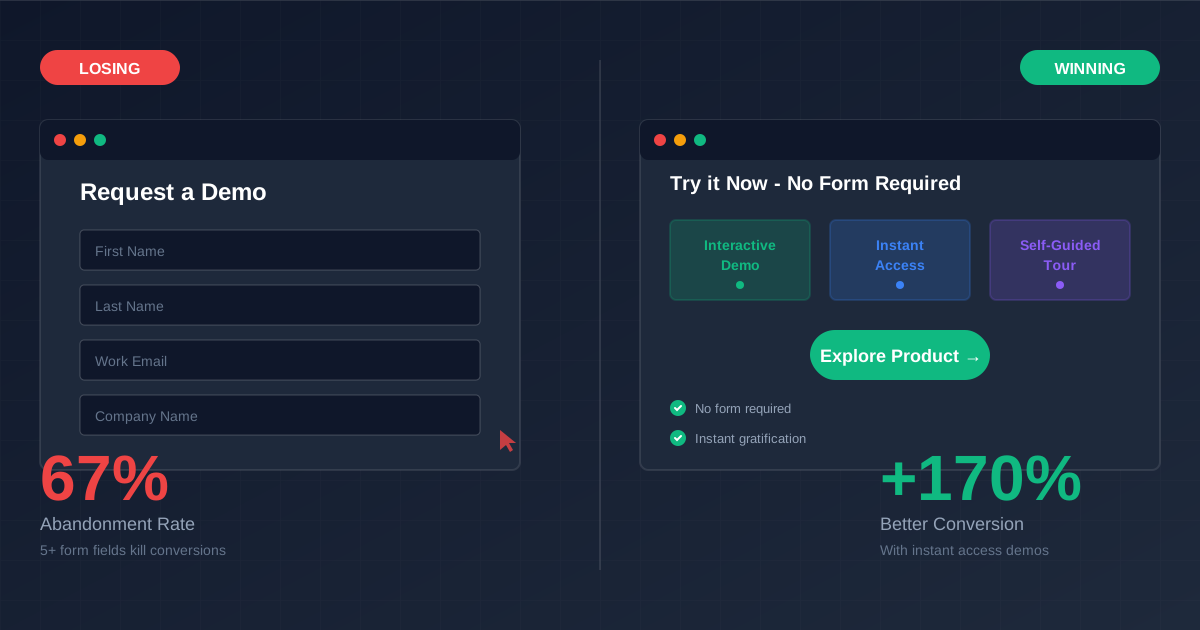
When a prospect lands on your website, they're usually looking for a solution to a specific problem. They've found your product and are in the early awareness or education stage of the buying journey. But here's the problem: "Book a Demo" or "Request a Demo" forms with more than 5 fields can see bounce rates as high as 67%, according to Formstack research.
While your demo booking button intends to solve their immediate need (trying your product), it often becomes a high-friction barrier for someone who's just beginning to explore solutions.
Even worse, when companies use CTAs like "Try it now," "Try for free," or "Start a trial" but the link leads to a form, prospects feel tricked. This disappointment typically results in very high bounce rates from your trial booking form.
"Request a demo forms have a 67% abandonment rate when they include more than 5 fields." - Formstack Research
When prospects click these buttons, their intent is at an all-time high. They're essentially saying:
"I like what you're offering so much that I'd be willing to try it right now."
But then they're presented with a form that offers them:
- A delay to their goal: Instead of trying your platform immediately, they have to wait
- Unwanted commitment: A social and time commitment they might not be ready for
- Disappointing experience: Often just a form, or a walk-through video that doesn't let them actually experience your SaaS product
None of these outcomes are as effective as letting the prospect try your product immediately—even though many businesses intentionally put this blocker in place.
Is There a Better Alternative to "Book a Demo" Buttons?
Many marketers feel stuck, especially if their organization isn't product-led growth (PLG) focused and there's hesitation around these initiatives. But even if you are a PLG company, you can use these strategies to increase conversion rates by up to 1.7x.
Here are five proven alternatives:
- Interactive product demos
- Pre-recorded webinars
- Instant booking links
- Free trials
- Better booking forms
Let's explore each option in detail.
1. Interactive Product Demos
Prospects who click "Book a demo," "Request a demo," or "Try it now" generally fall into two categories:
- They want a sales call: Use an interactive demo to give them immediate value while the call gets scheduled. This builds excitement for the call and gives your sales team breathing room to prepare the perfect pitch.
- They prefer self-assessment: Use an interactive demo to let them evaluate product fit on their own, moving them faster through the sales cycle.
You can create something that answers the fundamental question: "Does your product actually do what you say it does?" This responds to their immediate need to understand your product better.
This might be enough to close the deal, or at minimum, it carries them into the sales call with a deeper understanding of what you offer—making that conversation far more productive. Most importantly, in both scenarios, you're increasing the velocity of your sales funnel.
Funnel velocity refers to the speed at which potential customers move through different stages of your sales or marketing funnel, from initial awareness to conversion. It's a key metric for measuring how effectively your sales and marketing efforts convert leads into customers.
Creating a demo or collection of demos that work for every inbound prospect isn't easy—but it's worth the investment. The demo calls your sales team delivers, prepared and maintained by sales enablement, are an excellent starting point for understanding how to cater to different prospect requirements.
How LiveDemo.ai helps: Our platform lets you create interactive product demos that prospects can explore immediately, without any form friction. Capture your product once, then customize it for different personas, use cases, or verticals. Prospects get instant access to a hands-on experience that answers their questions before they even talk to sales.
2. Pre-Recorded Webinars
Pre-recorded webinars offer a low-friction way to introduce prospects to your product while respecting their pace in the decision-making process.
At this stage, buyers are usually researching solutions, comparing features, and assessing which platforms best align with their needs. A pre-recorded webinar allows them to educate themselves without feeling pressured by sales calls or immediate commitments.
Why Pre-Recorded Webinars Work
Pre-recorded webinars showcase your product in action, letting prospects see how it solves the problems they're trying to address.
Unlike live webinars, pre-recorded ones are available on-demand, giving prospects the flexibility to watch at their convenience. This non-intrusive, self-service approach makes them ideal for those in the awareness or consideration stages of the buying process.
By answering common questions through Q&A sections and demonstrating use cases, pre-recorded webinars address objections and reservations before a live demo is scheduled. This makes your eventual one-on-one conversations more targeted and reduces friction in the sales funnel.
Best Practices for Pre-Recorded Webinars
- Keep it concise: Aim for under 30 minutes. Focus on key features, benefits, and solutions that align with your target audience's pain points.
- Clear CTAs: End with a strong call-to-action, such as "Book a demo now" or "Start your free trial." These CTAs should direct viewers to the next logical step without overwhelming them with too many options.
- Supplement with resources: Provide a leave-behind interactive product demo, downloadable guides, whitepapers, or case studies that further engage prospects and nurture them through the funnel.
Suggested Platforms
- Demio: Known for simplicity, Demio allows marketers to create both live and pre-recorded webinars. The platform offers interactive features like polls and handouts, even for pre-recorded sessions.
- EverWebinar: Built specifically for automated, evergreen webinars. It lets you schedule replays to appear as if they are live, increasing engagement while reducing effort.
- Zoom: While more commonly known for live meetings, Zoom's webinar feature allows for on-demand recordings. Ideal if you already use Zoom for other business purposes.
By utilizing pre-recorded webinars, you enable prospects to learn about your product in a way that feels natural and non-pressured, increasing the likelihood they'll progress further down the funnel at their own pace.
3. Instant Booking Links
Instant booking links offer a simple yet effective way to streamline your demo scheduling process. Rather than directing prospects to a traditional "Request a Demo" form that can feel like a barrier, instant booking links allow them to self-schedule a demo directly into your calendar.
This method provides immediate gratification for the prospect while increasing the likelihood of a successful conversion.
Why Instant Booking Links Are Effective
When a prospect is ready to take the next step, they don't want to wait for follow-up emails or phone calls to confirm availability. Instant booking links eliminate these delays, making the process seamless. By giving prospects control over when they meet with your team, you cater to their preferences, reducing friction and enhancing user experience.
Instant booking links also increase efficiency for your sales team. With the ability to automatically sync with your calendar, you reduce back-and-forth communication and improve the speed at which leads progress through the funnel. This is especially beneficial for high-volume inbound marketing strategies where automation can help scale personal interactions.
Best Practices for Instant Booking Links
- Ensure calendar availability: Make sure the calendar you connect is updated in real-time. Block off internal meetings or non-working hours to avoid overbooking.
- Offer multiple time zones: Make it easy for prospects in different time zones to book by displaying availability in their local time.
- Set expectations: Include a brief description of what the demo will cover to set clear expectations about the value they will receive.
- Send resources ahead of time: By sharing a product demo beforehand using LiveDemo.ai, you can improve qualification and ensure that your call is an effective use of everyone's time.
Suggested Platforms
- Calendly: A user-friendly platform that integrates with various calendar systems (Google, Office 365, Outlook) and allows prospects to schedule meetings instantly. It offers features like buffer times between meetings and automatic timezone detection.
- HubSpot: If you're already using HubSpot for your CRM and email marketing, its meeting scheduling tool offers a built-in solution. It allows prospects to book demos directly from emails, landing pages, or even chatbots.
- Reclaim.ai: Another user-friendly platform with a wide variety of features to make it easier to slot these meetings into your calendar.
By using instant booking links, you reduce the back-and-forth communication that often delays the demo scheduling process. Prospects who are ready to engage can move forward quickly, improving your chances of converting them into customers.
4. Free Trial
A well-designed free trial is a highly effective tool for inbound opportunities. The challenge is that designing a free trial that leads to conversions requires significant work. At LiveDemo.ai, we have a free trial, and we've spent considerable time improving the pathway to conversion. A substantial amount of time and energy needs to go into this experience to make it effective.
Your Product Might Be Too Complex for a Free Trial
Dropping a prospect into your platform without guidance can lead to a negative perception of your offering. This is particularly true when the product is:
- Very complex
- Utilizes data that might not exist yet
- Requires a lot of knowledge about the problem-space
- Needs configuration, team members, or users onboarded
Creating Sandbox Environments Is Difficult
Development and engineering teams would love to have a solution for their marketing and sales function that shows off what they're building. The challenge is that it can be extremely complicated to create a demo environment that effectively demonstrates the platform for a wide variety of reasons:
- Dashboards & Data: Fake data is very difficult to generate on an ongoing basis, but for enterprise applications this is often the most valuable thing you can present. Having a cohesive narrative to that data is even more challenging.
- Authentication: Creating simplified ways of accessing your platform conflicts with security best practices. Security teams can find it challenging to balance commercial access needs with necessary constraints on system access.
- Ongoing Maintenance: How do you reset the sandbox? When does that occur—every day, week, month? This needs to be automated, but doing that requires even more development time. Even if you do automate it, how do you make sure the maintenance stays in lock-step with the application as it changes over time? It's really easy to accidentally break your sandbox environment.
- Onboarding Tutorial Tooltips: Once you've solved the challenges above, providing context to new users is really important. You could implement a series of onboarding tooltips, but this requires more development time and requires your engineering team to include the product marketing function in the development process on an ongoing basis. Otherwise, your tooltips can end up out-of-sync or worse, removed unintentionally because there's a need to change the underlying UI/UX.
How LiveDemo.ai helps: Instead of building complex sandbox environments, you can create interactive demos that showcase your product with realistic data and workflows. These demos don't require ongoing maintenance, don't need authentication systems, and can be updated quickly when your product changes. They give prospects the hands-on experience they want without the engineering overhead.
5. Better "Book a Demo" Forms
A well-designed "Book a Demo" form is crucial for capturing high-intent leads without introducing unnecessary friction. Unfortunately, many companies rely on forms that are long, tedious, or poorly optimized, resulting in high bounce rates and low conversion rates. The key to creating a more effective demo form is to make it as intuitive and painless as possible.
Why Booking Forms Often Have Low Conversion Rates
Forms that ask for too much information upfront tend to scare off prospects. If your form requires filling out detailed company profiles, budgets, or project timelines, it can overwhelm users who are simply looking to learn more about your product.
Additionally, forms that don't provide immediate confirmation or next steps leave prospects wondering what will happen next, reducing their likelihood of continuing engagement.
Best Practices for Better "Book a Demo" Forms
- Keep it short: Ask for only the most critical information—realistically this is probably just their name and email address. According to a study by HubSpot, reducing the number of form fields from 4 to 3 increases form conversions by 50%. This reduces friction and increases form completion rates. You can gather more detailed information in follow-up communication.
- Provide immediate feedback: Use dynamic form fields that display confirmation messages or progress indicators to let users know their submission has been received.
- Offer value right away: Upon submission, provide instant access to valuable resources, such as a product tour or a whitepaper. This keeps the prospect engaged and excited about your product before the demo.
Suggested Platforms
- Typeform: Known for its clean, conversational design, Typeform makes forms feel more engaging. Its customizable templates allow you to ask relevant questions and present them one at a time, reducing overwhelm.
- Formstack: This platform specializes in creating forms that integrate seamlessly with your CRM, allowing you to streamline data collection and follow-ups.
- Leadformly: Designed specifically for lead generation, Leadformly offers optimized templates and lead capture features that make it easier to track where prospects are in the funnel.
By simplifying your "Book a Demo" form and providing immediate value, you'll keep prospects engaged and increase the chances that they'll move forward with scheduling a demo.
How LiveDemo.ai Solves the Demo Booking Problem
At LiveDemo.ai, we've built our platform specifically to address the conversion problems that traditional demo booking creates. Here's how we help:
- Instant access: Prospects can explore interactive demos immediately—no form required. They get hands-on experience with your product right away, answering their questions before they even talk to sales.
- Self-service qualification: Interactive demos let prospects self-assess product fit, moving qualified leads faster through your funnel while filtering out those who aren't a good match.
- Reduced sales team workload: By letting prospects explore demos on their own, your sales team can focus on high-intent opportunities rather than basic product education.
- Better conversion data: Track which demos prospects engage with, how long they spend, and where they drop off. This data helps you understand buyer intent and prioritize follow-ups.
- Seamless handoff: When prospects are ready for a sales call, they come in already educated about your product, making those conversations far more productive.
Instead of forcing prospects through a form barrier, LiveDemo.ai gives them immediate access to an interactive product experience that builds excitement and moves them closer to a purchase decision.
Final Thoughts
Traditional "Book a Demo" buttons with lengthy forms are losing you conversions. The 67% abandonment rate isn't a problem you have to accept—it's a problem you can solve.
The key is to match the prospect's intent with the right experience:
- High intent, wants to explore: Give them an interactive demo immediately
- Wants to learn at their pace: Offer pre-recorded webinars or on-demand content
- Ready to talk: Provide instant booking links with minimal friction
- Prefers hands-on: Design a thoughtful free trial experience
- Needs to fill a form: Make it as short and valuable as possible
By implementing these alternatives, you'll reduce friction, increase conversion rates, and create a better experience for both your prospects and your sales team.
The best approach is often a combination: Offer an interactive demo for immediate exploration, then provide a simple booking form or instant booking link for those ready to talk. This gives prospects options and respects where they are in their buying journey.
Try LiveDemo.ai Free →
No credit card required. Create your first interactive demo in under 10 minutes.