
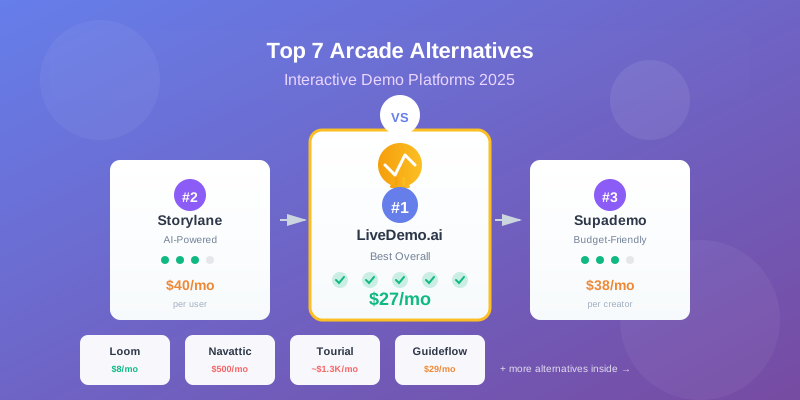
Arcade AI sits in the middle of the AI demo and explainer-video market: it is not the cheapest creator tool, but it is built around fast product storytelling, polished walkthroughs, GIF/MP4 exports, and team-ready demo publishing. For B2B SaaS teams comparing Arcade, LiveDemo.ai-style product demo workflows, avatar video tools, and screen-recording editors, the real question is not just "What is the monthly price?" It is whether the pricing model matches how your marketing, sales, and product teams actually create demos.
As of October 7, 2026, Arcade's public pricing shows a Free plan, a Growth plan at $50 per seat per month or $42.50 per seat per month on annual billing, and custom Enterprise pricing. Growth includes up to 10 users, unlimited published demos and AI videos, MP4/GIF exports, custom branding, integrations, and 800 AI credits per month; Enterprise adds controls such as role-based access, multiple teams, SSO, custom domains, and 100,000 AI credits per year. (arcade.software)
💰 How does Arcade pricing compare with other AI tools?
Arcade pricing is most competitive when your main job is creating product walkthroughs and demo-led marketing assets, not generic avatar videos or long-form video editing. Compared with lower-priced AI video tools, Arcade costs more per seat, but its value comes from combining interactive demos, AI-assisted product storytelling, exports, branding, CTAs, forms, analytics, and team workspaces in one workflow. (arcade.software)
A simple price comparison can be misleading because each product bills differently. HeyGen uses creator-style video credits, Runway sells generative media credits, Descript prices editing seats, Supademo prices demo creators, and Pictory combines user seats, video minutes, and AI credits. Those different AI pricing models can make one platform look cheaper at first and more expensive once the team starts producing content every week.
For teams considering LiveDemo.ai or similar demo automation options, this table highlights an important point: "AI tool" is too broad a category. A product marketer building interactive onboarding demos has very different needs from a creator generating talking-head videos or a designer producing cinematic AI clips.
📊 The three pricing models that shape total cost
Most AI pricing strategies in this category combine subscription access with some kind of usage control. The subscription pays for the workspace, seats, exports, integrations, and support. The usage layer controls expensive AI generation, such as video creation, avatar rendering, translation, voice, or image generation.
1. Per-seat pricing
Arcade's Growth plan is priced per seat, which is easy to understand when only a few people create demos. It becomes more expensive as more stakeholders need editing access, though viewers and prospects are not the same as creators. This model fits marketing teams with a clear group of demo builders.
2. Credit-based pricing
Arcade, HeyGen, Runway, Pictory, and others use credits in different ways. Arcade states that demos are credit-free, while videos cost 50 credits per 30 seconds and visuals cost 50 credits each. That means a team can publish many interactive demos without burning credits, but AI video generation needs active monitoring. (arcade.software)
3. Bundled creator pricing
Supademo's Growth plan bundles five creators and adds extra creators at a stated monthly rate. That can be easier for sales enablement or presales teams that know the number of people producing demos, especially when they need advanced demo types such as sandbox demos. (supademo.com)
The practical takeaway: do not compare only the first visible price. Compare the unit that matters for your team: seats, creators, minutes, credits, published demos, export formats, or enterprise controls.
🏆 Where Arcade looks strongest
Arcade's strongest pricing argument is focus. It is designed for product stories: show the product, guide the viewer, add calls to action, collect engagement, export assets, and keep the experience polished. For SaaS marketing teams, that can replace a messy stack of screen recording, light editing, GIF creation, landing-page embedding, and basic analytics.
This matters when a team is refreshing website demos, launching new features, supporting sales with leave-behind demos, or building help-center explainers. In those cases, paying more than a basic AI video subscription can be reasonable because the output is closer to the buyer journey. A generic avatar tool may create a nice video, but it may not show your product flow as clearly.
Arcade is also attractive when demos are frequent but AI video generation is moderate. Since Arcade's pricing page says demos are credit-free, a team focused mainly on interactive demos may get more predictable value than a team producing many AI-generated videos and visuals every month. (arcade.software)
⚖️ Where other tools may be cheaper or more capable
Arcade is not the lowest-cost option if your main need is AI video generation. HeyGen's Creator plan starts lower and is better aligned with avatar-led videos, voice cloning, language workflows, and short-form presenter content. Its $29 Creator plan includes 600 credits per month, though teams that outgrow Creator may need to move into Pro or Business-style options. (help.heygen.com)
Runway is stronger for creative generative media. If your team needs cinematic AI clips, model access, images, video generation, and experimental assets, Runway's credit packages may deliver more creative flexibility for less than a demo platform. But it will not solve the structured SaaS walkthrough problem by itself. (runway.com)
Descript is often a better fit for podcast, webinar, tutorial, and interview editing. It helps teams edit by transcript, record, publish, and use AI editing features, but it is not a dedicated interactive demo layer. Pictory is useful for script-to-video and content repurposing, especially when the source material is already written.
Supademo and Demoboost-style platforms compete more directly with Arcade on demo automation. Supademo's higher tiers include guided HTML demos and sandbox demos, which may matter to presales or customer success teams that need deeper product environments rather than lightweight marketing walkthroughs. (supademo.com)
👥 Which tool fits your team size and budget?
A two-person startup, a five-person marketing team, and a 20-person enterprise go-to-market organization should not evaluate Arcade software pricing the same way. The right choice depends on who creates content, how often assets change, and whether demos influence pipeline, onboarding, or support.
Use these scenarios as a practical filter:
- Solo founder or early startup: Start with free or low-cost tiers. Arcade Free can validate whether interactive demos help, while HeyGen, Descript, Pictory, or Runway may be cheaper for single-purpose video work.
- Small SaaS marketing team: Arcade Growth can make sense when product walkthroughs, landing-page embeds, GIFs, and branded demo assets are central to campaigns. Compare it against LiveDemo.ai and other demo-first options, not just AI video generators.
- Sales-led team with many reps: Look closely at creator limits, viewer access, CRM needs, demo libraries, analytics, and governance. A tool with a higher monthly fee may be cheaper operationally if it reduces manual demo prep.
- Enterprise organization: Custom pricing is normal. Prioritize SSO, role-based access, multiple teams, custom domains, onboarding, security review, and predictable annual credit allocation.
The budget question is not "Can we find a cheaper AI tool?" The better question is "Which platform reduces the most work in the workflow we repeat every week?"
✅ A simple checklist before choosing Arcade or an alternative
Before committing to Arcade pricing or any competing AI pricing models, map your expected usage. This prevents the classic problem of buying a tool for its demo and discovering the real cost after content production scales.
- Count creators, not employees. Who needs edit access, and who only needs to review or view?
- Estimate monthly demo volume. Separate interactive demos from AI-generated videos and visuals.
- Calculate credit pressure. For Arcade, AI videos and visuals consume credits, while demos are listed as credit-free. (arcade.software)
- List must-have outputs. MP4, GIF, embedded demo, landing page, PDF, sandbox demo, or avatar video all point to different tools.
- Check feature gates. Advanced branding, integrations, HTML capture, SSO, custom domains, and governance can change the real plan you need.
- Model annual cost. Include extra seats, credit packs, onboarding, procurement time, and any parallel tools you still need.
💭 The bottom line for B2B SaaS teams
Arcade AI is priced like a focused product storytelling platform, not a bargain-bin AI video app. It will often look more expensive than HeyGen, Descript, Runway, or Pictory on the first line item, but it may be more relevant when the business goal is turning software workflows into persuasive demos.
For teams comparing Arcade with LiveDemo.ai and other demo-first platforms, the best decision comes from matching price to workflow. Choose Arcade when fast, polished product walkthroughs and demo exports are the core job. Choose a specialist video, editing, or sandbox-demo platform when your real need is avatar content, long-form editing, generative media, or deeper presales environments.
If you think LiveDemo.ai could work for you, feel free to dive into our free trial! 🚀
Try LiveDemo.ai Free →
No credit card required. Set up your first demo in under 10 minutes.