Highperformr - How to Use Twitter Analytics to Create a Content Strategy
- George Apostolov
Highperformr - How to Use Twitter Analytics to Create a Content Strategy: step-by-step guide
Understand your social presence. Get insights tailored to your social media goals with Highperformr Analytics.
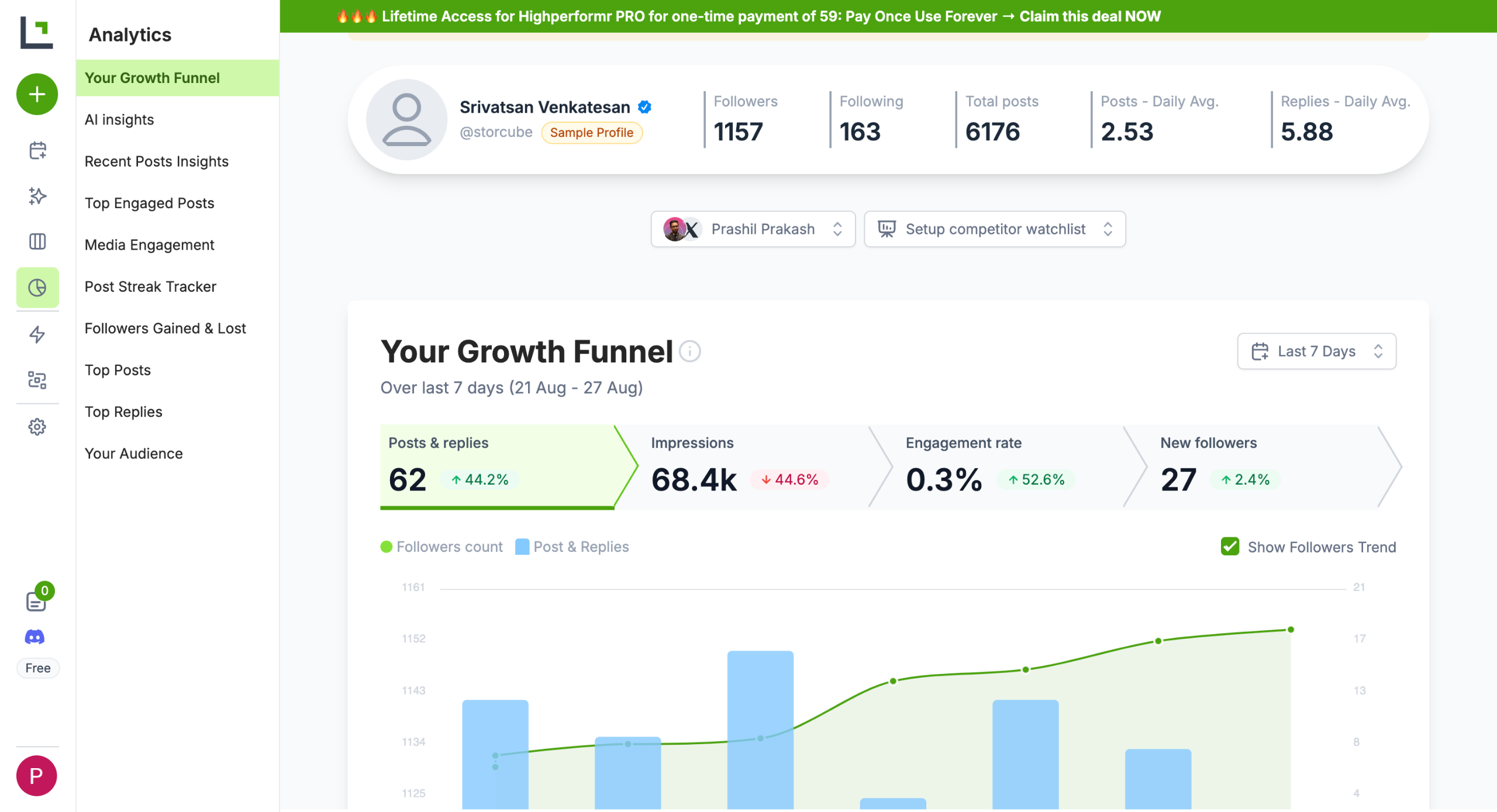
Head over to Analytics (pie icon) on the left sidebar.
Monitor Your Growth Funnel and get a visual overview of your impression and engagement metrics.
Scrolling down, you will get Recent Post Insights.
Scroll further to see your Top Engaged Posts. You also get a clear idea of what type of media (Text, Images/Video) gets the highest engagement.
Post Consistency Tracker helps you visualise your posting streak.
You also get an overview of the followers you gained and lost in a specific period.
Top Posts gives you a granular look at impressions, replies, and likes on your top-performing posts.
Don’t shoot in the dark Monitor what you’re doing and iterate on your strategy based on insights from data analytics.
Quick answer: To build a Twitter content strategy, first open Analytics from the left sidebar to view your growth funnel, impression and engagement metrics. Next, review recent post insights, top engaged posts by media type, and your post consistency tracker. Finally, analyze follower changes, top post metrics, and iterate on your strategy using data analytics.
About this Twitter tutorial
Optimize your Twitter content strategy using Highperformr Analytics to track growth funnels, post consistency, and engagement metrics. This guide covers highperformr - How to Use Twitter Analytics to Create a Content Strategy in 9 steps, starting with "Understand your social presence. Get insights tailored to your social media goals with..." and finishing with "Don’t shoot in the dark Monitor what you’re doing and iterate on your strategy based on...". The interactive demo above is a click-through copy of the real Twitter interface, so you can rehearse each step before doing it in your own account.
Frequently asked questions
How many steps does highperformr - How to Use Twitter Analytics to Create a Content Strategy take?
9 steps. Each one is listed in order above, and the demo highlights exactly where to click.
Can I try it without changing my own account?
Yes. Clicking through the demo doesn't touch your Twitter data or settings. Once you know the flow, repeat it in your own workspace.
This tutorial is filed under Twitter. Related guides: How to Monitor Twitter Hashtag Usage in Coda, How to Connect a Twitter Account to Hootsuite and How to Connect Coda with Twitter. Last reviewed 05 Oct 2026.

Create your first interactive demo in minutes
No credit card required • Start building today