How to use Chatsimple as your website sales agent
- George Apostolov
How to use Chatsimple as your website sales agent: step-by-step guide
AI sales agent for your website Empower sales and support with Chatsimple's simple, no-code AI chatbots.
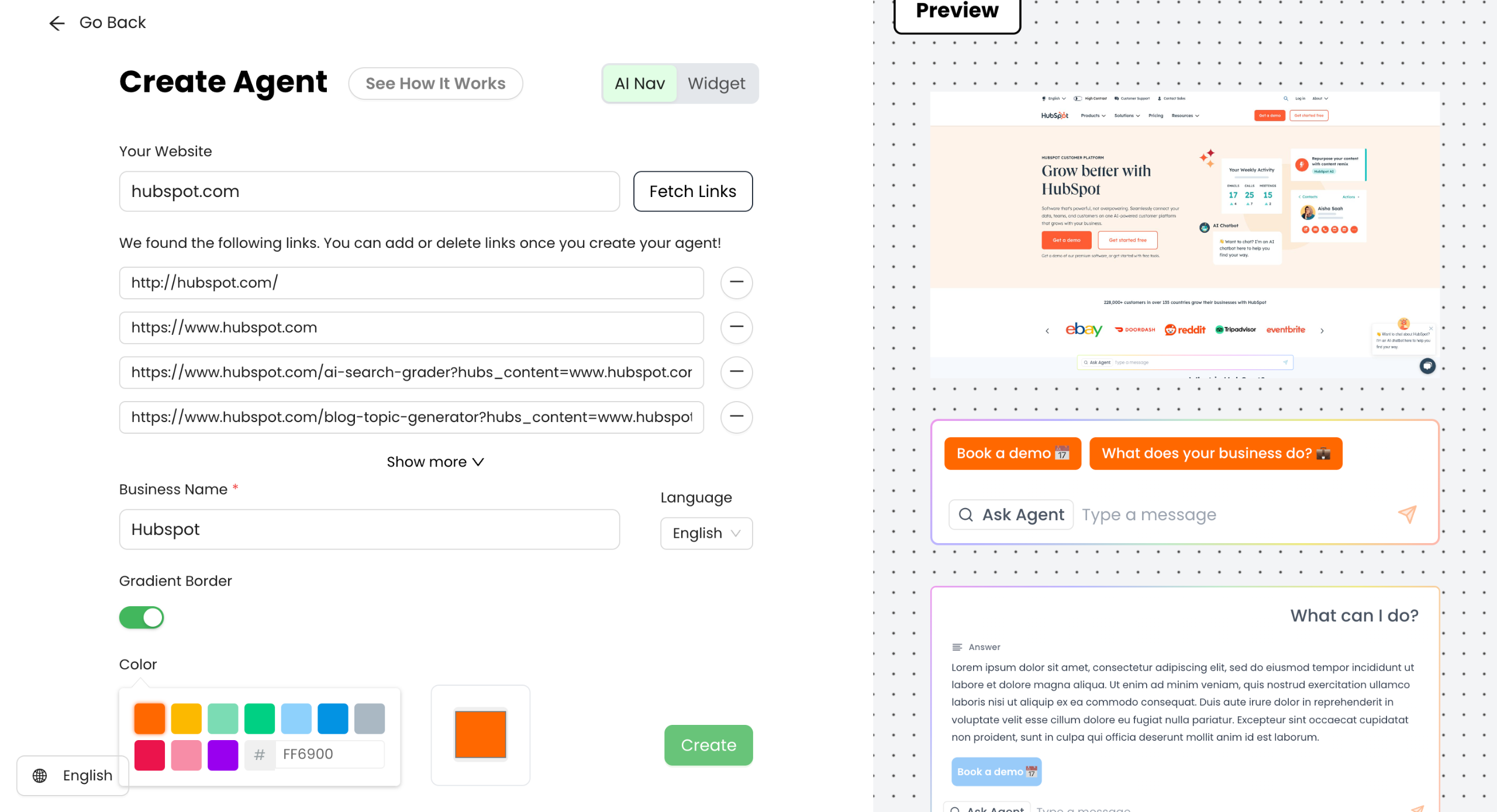
Start by entering your website URL, and click on Fetch Links.
You can set the color theme of your AI agent based on your brand colors and hit Create.
You will see a preview of the AI agent on your website on the right.
Now you can customize your AI agent's appearance.
For example: Add a suggested question to help your visitors decide what to ask.
Play with CTA and button texts like: Use "Talk to Sales" and link it to your sales team's calendar.
You can also define your Business Goals by finding it on the left sidebar
Set clear objectives for your AI agent (e.g., booking meetings and product purchases).
Use "if-then" statements to create conditions and actions. (Example: "If users show interest in Marketing Hub, request a scheduling meeting.")
You can also go to the Qualify Leads to create questions to gather essential customer information (e.g., phone model, budget).
Save and Activate..
Your AI Sales agent is now ready! You can click on the generated link to view it.
You can now see the AI agent deployed. You can start interacting and testing the agent.
Test the agent by selecting one of the suggested questions. You can also ask any question in the text field.
The AI Agent provides a clear answer and also gives relevant next steps for your visitors.
Quick answer: To use Chatsimple as your website sales agent, enter your website URL, fetch links, and set your brand color theme to create your AI agent. Customize its appearance with suggested questions and CTAs, define business goals and qualification questions, save and activate, and test the deployed agent on your site.
About this tutorial
Deploy an AI sales agent on your website by fetching links, customizing appearance, defining goals, and testing the bot using the app. This guide shows how to use Chatsimple as your website sales agent in 16 steps, starting with "AI sales agent for your website Empower sales and support with Chatsimple's simple, no-..." and finishing with "The AI Agent provides a clear answer and also gives relevant next steps for your visitors". The interactive demo above is a click-through copy of the real product interface, so you can rehearse each step before doing it in your own account.
Frequently asked questions
How many steps does it take to use Chatsimple as your website sales agent?
16 steps. Each one is listed in order above, and the demo highlights exactly where to click.
Can I try it without changing my own account?
Yes. Clicking through the demo doesn't touch your data or settings. Once you know the flow, repeat it in your own workspace.

Create your first interactive demo in minutes
No credit card required • Start building today