How to Start a Coworking Space with Spacebring
- George Apostolov
This guide is an interactive LiveDemo. Create interactive demos of your own product: Interactive demo software · Interactive customer onboarding guides · Start free
How to Start a Coworking Space with Spacebring: step-by-step guide
Spacebring coworking space management platform is your coworking space in a pocket
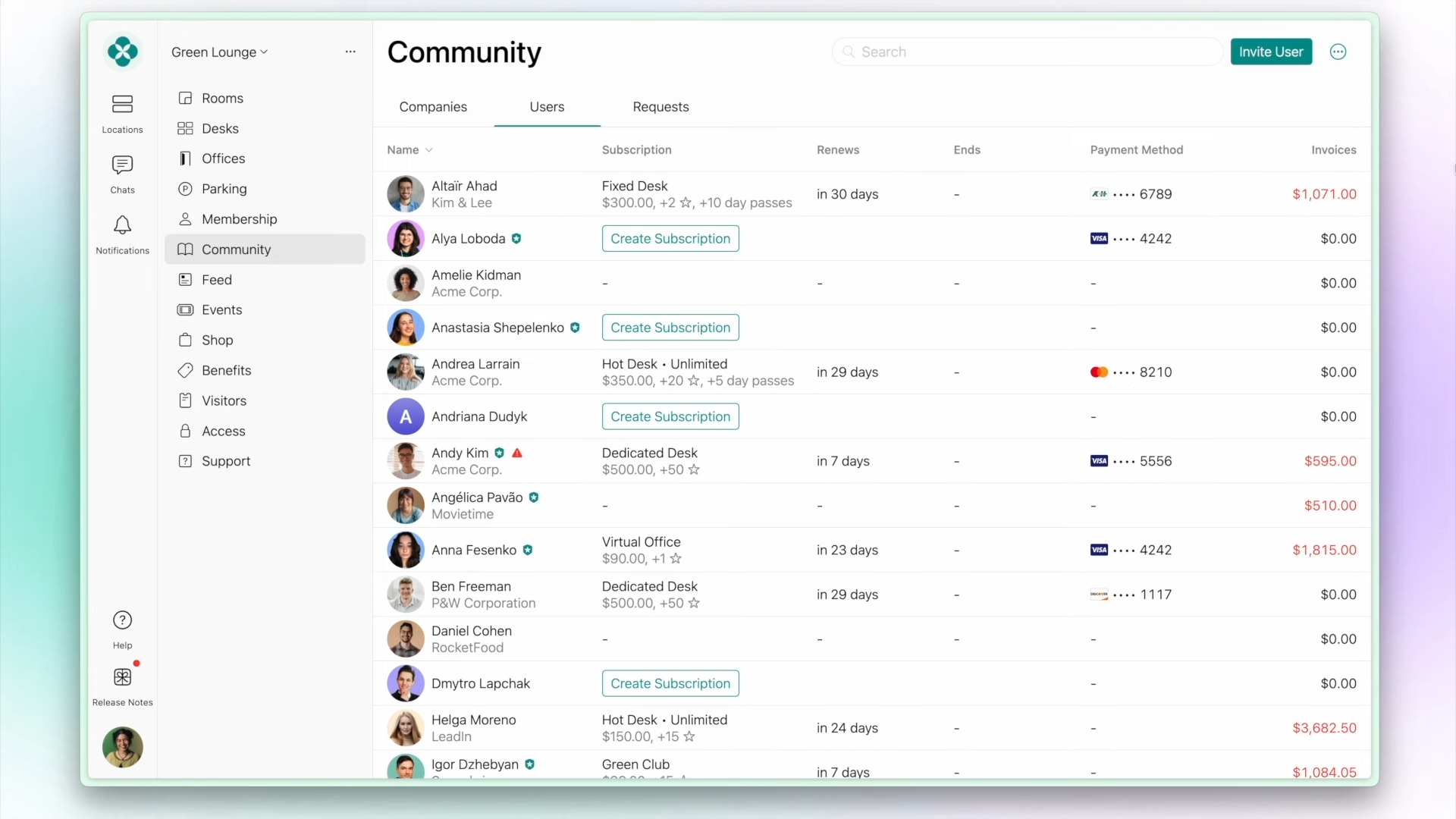
Head over to Spacebring's community tab to quickly find information about tenant companies and individual users. It's like a central hub for your operations.
You can find detailed member info with integrated communication tools and subscription tracking.
Scroll down to find everything from subscriptions, notes, files, invoices, bookings, and orders.
Auto-invoicing and Auto-pay features ease the the end user experience.
You also get a room booking interface with duration and attendee management.
Head over to Rooms for a visual scheduling with color-coded bookings and resource management.
Flexible Payments : Multiple payment methods from credits to cards, keeping transactions smooth.
Real-time desk availability with visual mapping and instant booking.
Use the self-service desk reservation with integrated credit system and ease booking hot desks.
You can go to track Occupancy and utilization patterns across all space types to optimise your space for capacity.
Quick answer: To start a coworking space with Spacebring, manage community tenants, track subscriptions and invoices, schedule rooms visually, handle flexible payments, utilize real-time desk availability with self-service reservations, and track occupancy patterns across all space types to optimize capacity.
About this tutorial
Manage tenants, automate invoicing, schedule rooms, and track real-time desk availability using the app for your coworking operations. This guide shows how to start a Coworking Space with Spacebring in 11 steps, starting with "Spacebring coworking space management platform is your coworking space in a pocket" and finishing with "You can go to track Occupancy and utilization patterns across all space types to optimi...". The interactive demo above is a click-through copy of the real product interface, so you can rehearse each step before doing it in your own account.
Frequently asked questions
How many steps does it take to start a Coworking Space with Spacebring?
11 steps. Each one is listed in order above, and the demo highlights exactly where to click.
Can I try it without changing my own account?
Yes. Clicking through the demo doesn't touch your data or settings. Once you know the flow, repeat it in your own workspace.

Create your first interactive demo in minutes
No credit card required • Start building today