Page rules
One agent, different behavior per page. Set them in the agent's Share → Settings → Page rules.
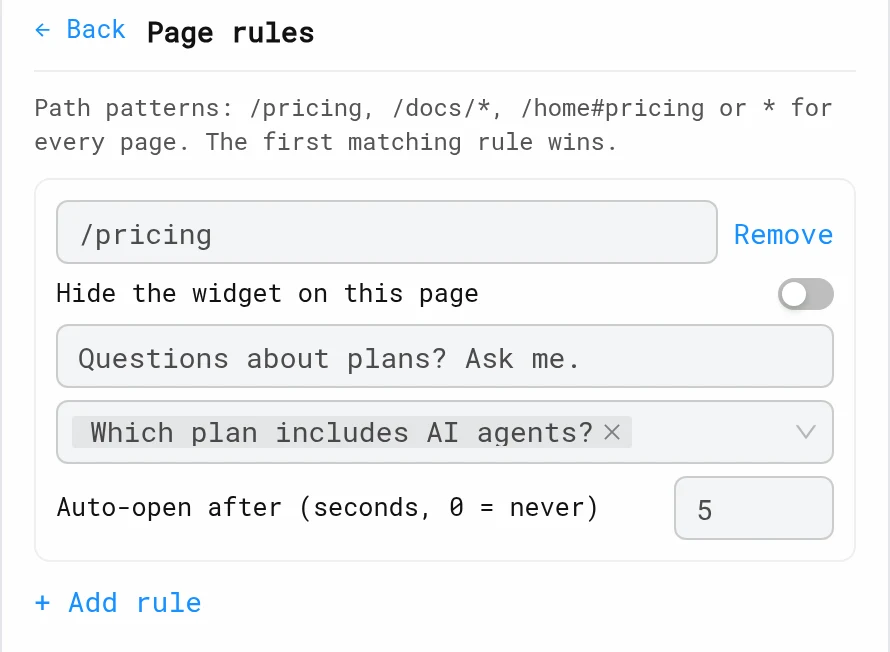
| Field | What it does |
|---|---|
| Path pattern | /pricing (exact), /docs/* (the section and everything under it), * (every page) |
| Hide the widget on this page | No launcher and no auto-open. data-livedemo-open buttons still work |
| Teaser text | The launcher's message on this page |
| Starter questions | Up to 4 |
| Auto-open after | Opens after N seconds (0 = never). Once per browser session |
The first matching rule wins, so put specific paths above broad ones like *.
Example setup
| Path pattern | Teaser | Auto-open |
|---|---|---|
/pricing | "Questions about plans? Ask me." | 5 s |
/integrations/* | "Want to see an integration in action?" | 0 |
/checkout | Hidden | — |
/blog/* | "Curious how this works in the product?" | 0 |
* | "Get a 2-minute demo" | 0 |
Tips
- Auto-open only on high-intent pages (pricing, demo request). Auto-opening everywhere annoys visitors.
- Starter questions should match the page: integration questions on integration pages.
- The agent also knows the page, referrer and UTM campaign. See Website Widget.
Next: Crawl your website
More in AI Demo Agent
- Create an AI Demo Agent: Create an AI Demo Agent that answers buyer questions from your knowledge, opens the right LiveDemo, qualifies visitors and books meetings.
- Persona: Set your AI Demo Agent's welcome message, starter questions and extra instructions so it sounds like your best sales rep.
- Voice & Avatar: Give your AI Demo Agent an ElevenLabs voice and an Anam or LemonSlice video avatar, or create an avatar from a photo.
- Demos, Theme & History: Pick which demos the AI Demo Agent can open, set its theme, and undo or revert changes with version history.
- Knowledge: Teach the AI Demo Agent from your whole website, documents, FAQs and sales calls, see exactly what it reads, and fill the gaps.
- Crawl Your Website: Crawl your marketing site, docs or help center into the AI Demo Agent's knowledge and keep it up to date automatically.
- Knowledge Gaps: See the questions your AI Demo Agent couldn't answer, grouped by topic, and turn them into FAQ answers in one click.
- Lead Capture: Ask visitors for their name and email before the chat, capture emails during the conversation, or identify logged-in users from your site.
- Qualification & Booking: Let the AI Demo Agent ask your qualification questions, decide who is qualified with your own rules, and book meetings inside the demo.
- Personalized Demos: Show every prospect a demo with their own company name, first name and logo, from an agent link or your website.
- Conversation Insights: Every AI Demo Agent conversation gets a summary, topics, buying intent, unanswered questions and an optional recap email to the visitor.
- Summary Emails: Email AI Demo Agent visitors a recap of their conversation automatically, from LiveDemo or your own SMTP server.
- Recap Page: Every AI Demo Agent session gets a private, shareable recap page that visitors forward to their team, and you see who opened it.
- Website Widget: Put the AI Demo Agent on your website as a chat bubble, email pill, smart search bar, button or inline iframe, with different behaviour per page.
- JavaScript API: Open, close and identify visitors in the AI Demo Agent widget from your own code, and listen to lead, demo and booking events.
- Webhooks & Slack: Send AI Demo Agent leads, qualified visitors, bookings and conversation summaries to Slack, Zapier or your own endpoint with signed webhooks.