Zapier & Make
There's no Zapier app yet. Use a webhook instead: it works with Zapier, Make, n8n and your own backend.
Zapier
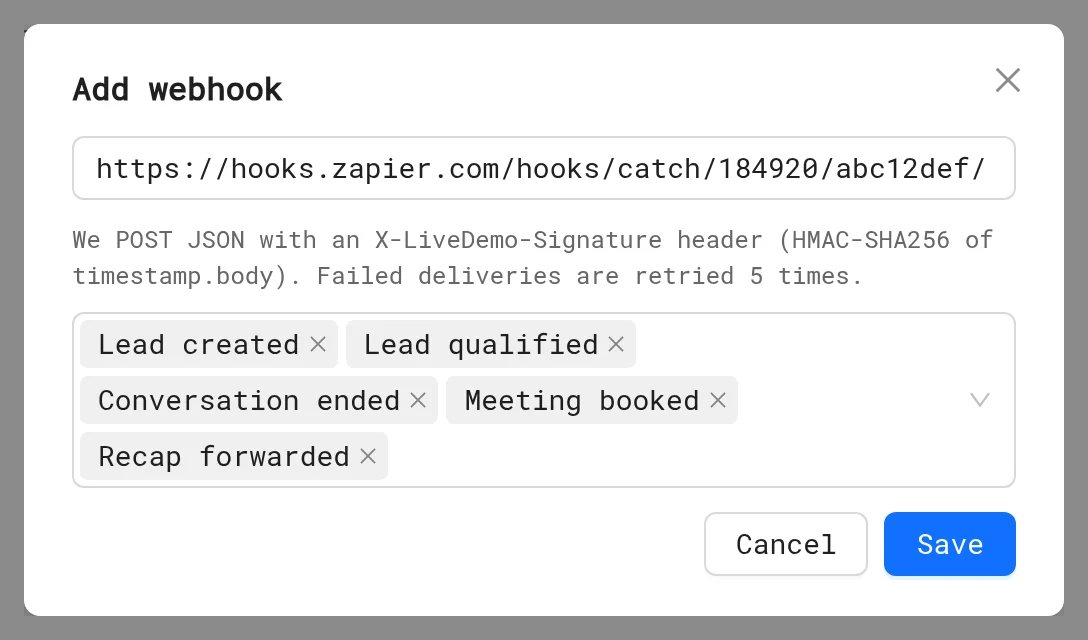
- Create a Zap with the trigger Webhooks by Zapier → Catch Hook and copy its URL.
- In LiveDemo, open Settings → Integrations → Webhooks & Slack, click Add webhook, paste the URL and pick the events.
- Trigger a test, for example leave your email in the agent's preview, so Zapier sees a sample.
- Add actions, such as Salesforce → Create Lead or Google Sheets → Create Row.
Make
- Create a scenario with Webhooks → Custom webhook and copy its URL.
- Add it in LiveDemo as above.
- Click Run once in Make, trigger a test, then map the fields.
Events
lead.created, lead.qualified, session.ended, meeting.booked and recap.viewed. Payloads, the X-LiveDemo-Signature header and retries are in Webhooks & Slack.
Popular recipes
| Event | Action |
|---|---|
lead.created | Create a lead in Salesforce or Pipedrive |
lead.qualified | Create a deal and assign an owner |
meeting.booked | Post in a team channel, update the CRM stage |
session.ended | Add a row with the summary to Google Sheets or Notion |
Webhooks cover AI Demo Agent events. Leads from demo forms are in Leads (CSV export) and HubSpot.
Next: Calendly & Cal.com
More in Integrations
- Integrations Overview: Connect LiveDemo to HubSpot, Slack, Zapier or Make through webhooks, and Calendly or Cal.com, to sync leads and get alerts.
- HubSpot: Connect HubSpot to LiveDemo to create contacts from demo and AI Demo Agent leads, add conversation notes, and use HubSpot forms in demos.
- Slack: Get Slack alerts when an AI Demo Agent captures, qualifies or books a lead, with the summary and a replay link.
- Calendly & Cal.com: Let visitors book a meeting inside the AI Demo Agent with Calendly or Cal.com, or inside a demo with an embed popup.
- MCP Server: Connect Claude, ChatGPT, Cursor or Claude Code to LiveDemo with the MCP server to list demos, get share links, read leads and create demos from a URL.